Kent National Bank AI Web Portal: Designing Trust into Compass
UX Research & Interaction Design — Kent State University, UX 60521 | Group Capstone, Banking Group
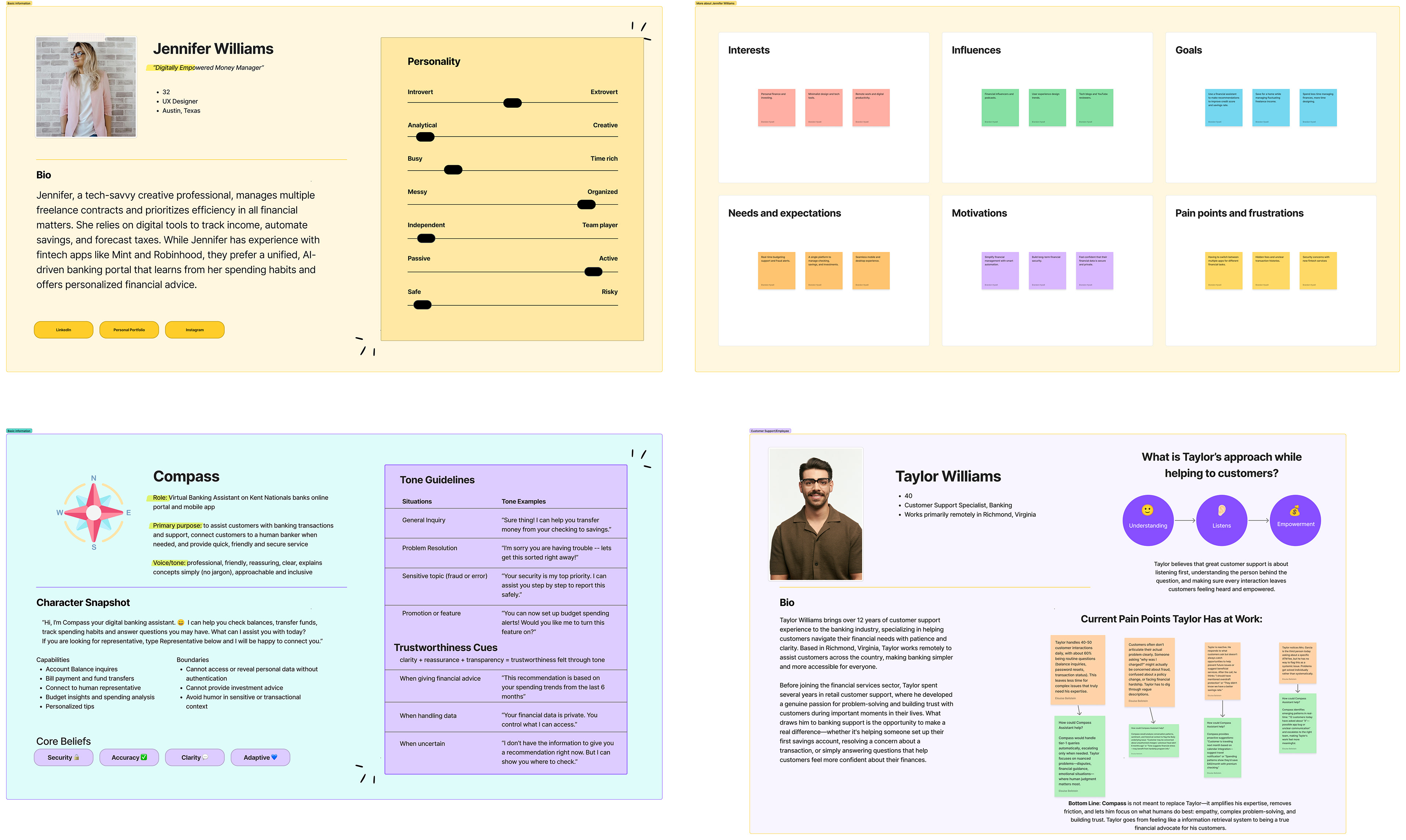
Personas
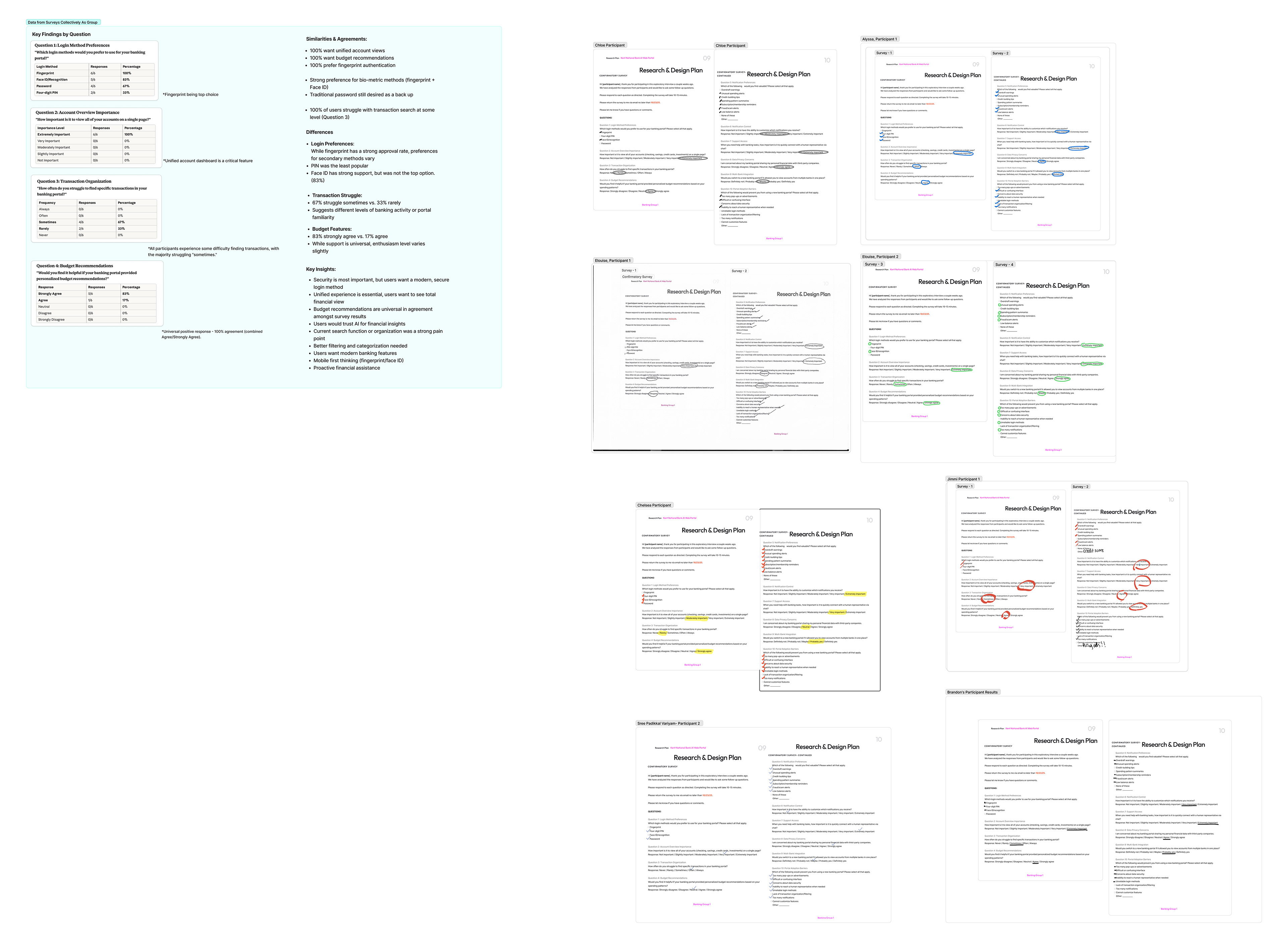
User Case Study/Interview Results
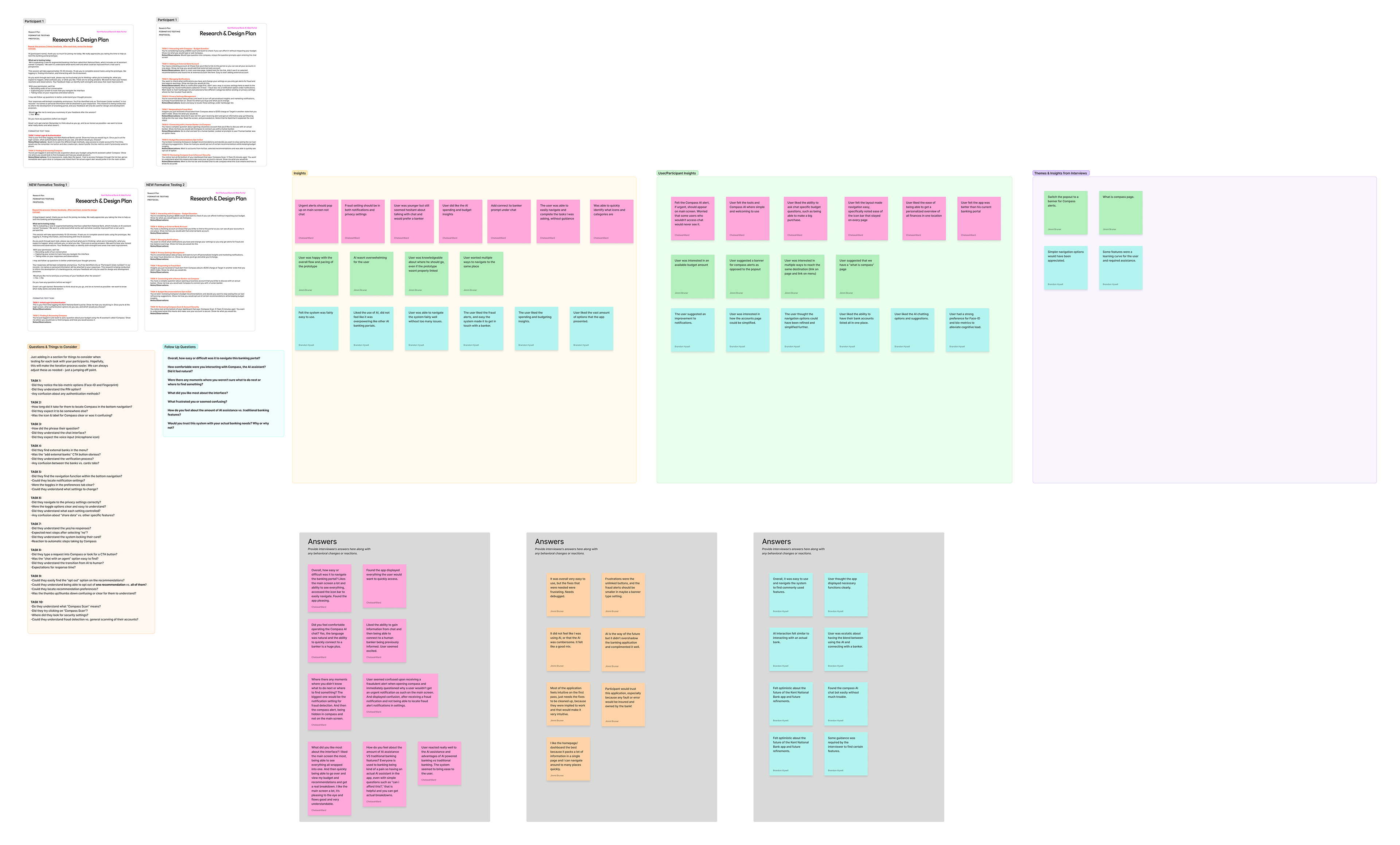
Usability Testing Insights
Summative User Testing
Lofi-Prototypes
Original Concept/Prototype
Login / Authentication
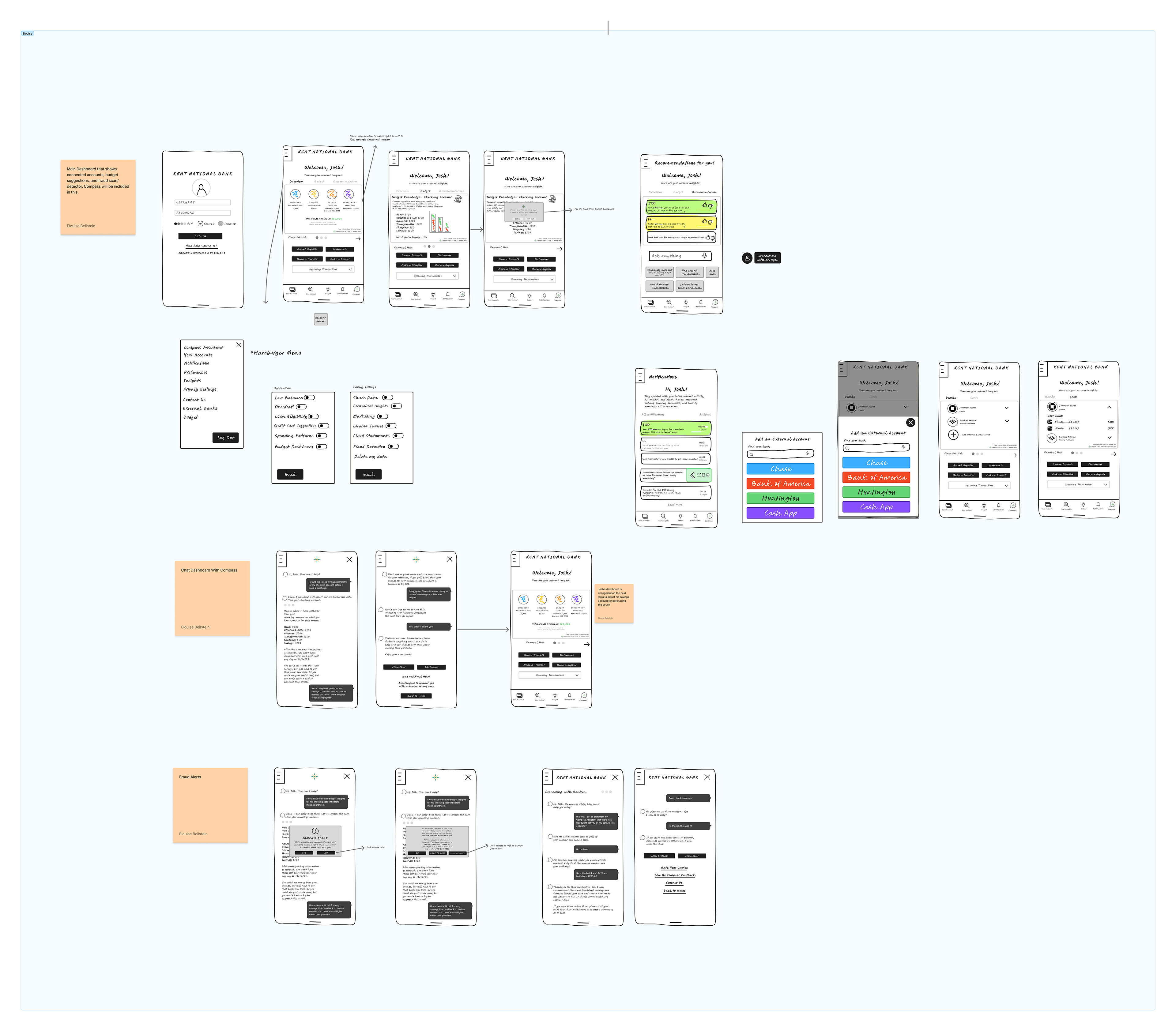
Initial login screen designed around research findings — 100% of participants preferred fingerprint authentication, with Face ID and PIN offered as alternatives.
Initial login screen designed around research findings — 100% of participants preferred fingerprint authentication, with Face ID and PIN offered as alternatives.
Dashboard — Account Overview
A unified account view was the single most requested feature in our confirmatory survey (100% agreement). This screen consolidates checking, savings, and budgeting insights into a single glanceable view.
A unified account view was the single most requested feature in our confirmatory survey (100% agreement). This screen consolidates checking, savings, and budgeting insights into a single glanceable view.
Dashboard — Budget Breakdown
Visual spending breakdown by category, designed to reduce the cognitive load users reported when trying to track spending across a traditional banking app.
Visual spending breakdown by category, designed to reduce the cognitive load users reported when trying to track spending across a traditional banking app.
Compass Chat — Budget Inquiry
Compass responding to a real user task from testing: "Can I afford an $800 couch?" Every recommendation surfaces its reasoning, reflecting the transparency principle that emerged directly from user research.
Compass responding to a real user task from testing: "Can I afford an $800 couch?" Every recommendation surfaces its reasoning, reflecting the transparency principle that emerged directly from user research.
Compass Menu / Settings Access
Quick access to account settings, notifications, and privacy controls directly from the Compass interface — designed so users never have to hunt for control over their own data.
Quick access to account settings, notifications, and privacy controls directly from the Compass interface — designed so users never have to hunt for control over their own data.
Notification Preferences
Granular toggles let users choose exactly which alerts they want (fraud, low balance, spending summaries), addressing user frustration with one-size-fits-all notification systems.
Granular toggles let users choose exactly which alerts they want (fraud, low balance, spending summaries), addressing user frustration with one-size-fits-all notification systems.
Privacy Settings
Users can turn off personalized insights and marketing while keeping fraud detection active — giving users control without forcing an all-or-nothing choice.
Users can turn off personalized insights and marketing while keeping fraud detection active — giving users control without forcing an all-or-nothing choice.
External Account Linking
Users can connect external accounts (Chase, Bank of America, etc.) to get a unified view — directly addressing the survey finding that 100% of users wanted a single-page account overview.
Users can connect external accounts (Chase, Bank of America, etc.) to get a unified view — directly addressing the survey finding that 100% of users wanted a single-page account overview.
Fraud Alert
A real-time fraud alert flow, designed to feel calm and clear rather than alarming — following the tone guideline that sensitive moments call for reassurance over urgency.
A real-time fraud alert flow, designed to feel calm and clear rather than alarming — following the tone guideline that sensitive moments call for reassurance over urgency.
Fraud Alert → Human Banker Escalation
Users can escalate directly from Compass to a live representative. This flow was added after formative testing showed users wanted a clear path from AI assistance to human support when the situation called for it.
Users can escalate directly from Compass to a live representative. This flow was added after formative testing showed users wanted a clear path from AI assistance to human support when the situation called for it.
Final Collaborative Prototype
Built by the full team from this original design foundation, incorporating additional testing feedback and refinements
Built by the full team from this original design foundation, incorporating additional testing feedback and refinements
Overview
A 10-week group research and design project exploring how AI could enhance a customer-facing banking portal — culminating in Compass, an AI banking assistant designed around a central tension our research uncovered: users want proactive, personalized AI support, but only if it's transparent and puts them in control.
My Role
Co-led exploratory research, personally conducting 2 of 7 user interviews
Designed the original prototype end-to-end — login/authentication, dashboard, Compass chat interface, notification and privacy settings, external account linking, and the fraud alert escalation flow
Developed Compass's conversational persona: tone guidelines, trustworthiness cues, and defined capabilities/boundaries
Authored the Taylor Williams persona (a bank support employee), reframing Compass not as a replacement for human support, but as a tool that removes friction so employees can focus on complex, human-centered problems
Research
Using the Design Science Research Method, our team conducted exploratory interviews followed by confirmatory surveys with banking customers. Key findings:
100% of participants wanted a unified account view and personalized budget recommendations
100% preferred fingerprint authentication, with Face ID as a strong secondary option
Every participant struggled to some degree with finding transactions in their current banking app
The central tension: users want AI-driven insights and proactivity, but transparency and data control are non-negotiable — "black box" AI recommendations undermine trust
Design
Working from these findings, I designed Compass's voice around three research-driven principles: transparency (always show the reasoning behind a recommendation), user control (easy opt-in/opt-out on every AI feature), and clarity (no jargon, calm tone even in sensitive moments like fraud alerts). I translated these principles into the full prototype — from onboarding through daily use cases like budget check-ins, account linking, and fraud response.
Testing & Iteration
Formative testing with real users surfaced concrete usability issues, which I addressed directly:
Users wanted a clear way to escalate to a human banker → added a "Connect to Banker" prompt directly inside Compass's chat interface
The fraud alert pop-up felt disconnected from the main flow → moved it to appear directly on the dashboard rather than requiring users to seek it out
Notification and privacy toggles needed clearer active/inactive states → refined visual states so users could see at a glance what they'd opted into
Outcome
The final validated prototype — built collaboratively by the team from this foundation — demonstrated that customers respond positively to AI banking support when transparency and control are designed in from the start, not bolted on. The project reinforced a principle I now carry into all my AI-related design work: trust isn't a feature; it's a byproduct of consistent, honest design decisions.